使用Python和Jenkins REST API获取git changes信息
因为工作中发生过很严重的 Regression Issue,当时的解决方案是在Daily Build中使用二分法找到出问题的Build, 过程比较繁琐,所以就有了这么个需求,要求记录Daily Build的git changes信息

gis2all
2021-06-01 发布 · 2021-06-01 更新 · 2 分钟阅读
因为工作中发生过很严重的 Regression Issue,当时的解决方案是在Daily Build中使用二分法找到出问题的Build, 过程比较繁琐,所以就有了这么个需求,要求记录Daily Build的git changes信息
Jenkins REST API可以获取到Build信息, 获取方式为
https://<your-jenkins-server>/job/<job-name>/<buildnumber>/api/json也就是在某个项目的Build的url里加上/api/json即可
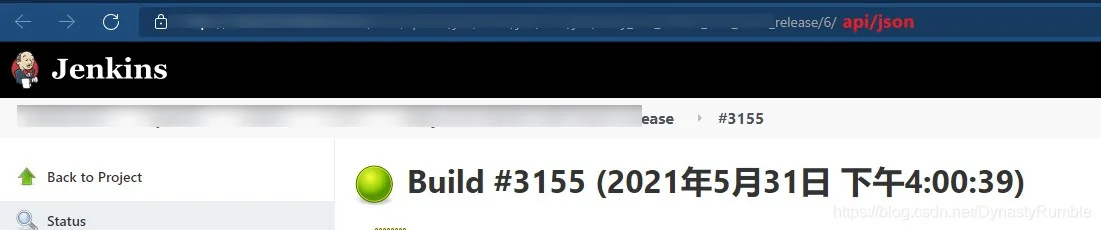
如果不知道Build number只想获取最新的build number信息, 可以使用 xxx/lastBuild/api/json
然后我们解析该json内容就可以获取到相应的Git changes信息了,另外还需要做一些Git判断
集成到Jenkins中还是使用Python脚本更方便,这里需要用到 GitPython和requests,基于Python 3环境
pip install GitPython
pip install requestschanges.py文件代码如下
# Use Jenkins REST API to get changes info
# install requests - pip install requests
# install GitPython  - pip install GitPython
from logging import fatal
import requests
import argparse
import json
from git import Repo

#### 将字符串List写入文件中
def writeChangesToFile(url, repo_path, branch_name, file_path):
    f = open(file_path, mode="w+", encoding="UTF-8")
    info_list = parseJson(url,repo_path)
    main_info = getMainInfo(branch_name,url)

    f.write(main_info)
    f.write("\n\n")
    if len(info_list) == 0:
        f.write("No changes!")
    else:
        for line in info_list:
            if info_list.index(line) == 0:
                f.write(line)
            else:
                f.write("\n")
                f.write(line)
            print(line)
    f.close()

#### 获取主要信息
def getMainInfo(branch_name, url):
    return "Branch name: {_branch_name}\nDetail: {_url}".format(_branch_name=branch_name, _url = url)


#### 获取URL页面的Json内容
def getJsonInfo(jsonURL):
    json_str = requests.get(jsonURL,verify=False).text
    return json.loads(json_str)

#### 将满足要求的Json字符串转化成字符串List
def parseJson(url, repo_path):
    text_list = []

    items = getRepoItems(url, repo_path)
    if(len(items)==0):
        return []
    counter = 1
    for item in items:
        msg = item["msg"]
        author_name = item["author"]["fullName"]
        affectedPaths = item["affectedPaths"]
        path_str = ""
        for path in affectedPaths:
            if affectedPaths.index(path) == len(affectedPaths) - 1:
                path_str += "        - " +  path
            else:
                path_str += "        - " + path + "\n"

        if items.index(item) == len(items) - 1:
            line = "{_counter}. {_msg} - {_author}\n{_path_str}".format(_counter=counter, _msg=msg, _author=author_name,_path_str = path_str)
        else:
            line = "{_counter}. {_msg} - {_author}\n{_path_str}\n".format(_counter=counter, _msg=msg, _author=author_name,_path_str = path_str)
        text_list.append(line)
        counter +=1

    return text_list


#### 获取这个Repo的Items
def getRepoItems(url, repo_path):
    earth_items = []
    try:
        json_text = getJsonInfo(url)
        # 这里或许有多个Git Repo,获取该Repo的Items
        if "changeSets" in json_text:
            changeSets = json_text["changeSets"]
            for changeSet in changeSets:
                items = changeSet["items"]
                for item in items:
                    commitID = item["commitId"]
                    if isRepoCommit(commitID, repo_path):
                        earth_items.append(item)
        else:
            earth_items = json_text["changeSet"]["items"]
    except:
        print("getRepoItems has a error")
    return earth_items


#### 判断Jenkins REST API获取到的commit信息是否是该Repo的commit
def isRepoCommit(commit_id,repo_path):
    repo = Repo(repo_path)
    commits = list(repo.iter_commits())
    for commit in commits:
        if commit_id == commit.hexsha:
            return True
    return False


#### 命令行使用带参数的python文件
def getArgs():
    parser = argparse.ArgumentParser()
    parser.add_argument("url")
    parser.add_argument("repo_path")
    parser.add_argument("branch_name")
    parser.add_argument("output_file")
    args = parser.parse_args()
    return args

if __name__ == "__main__":
    #url = "xxxx/_Daily_Build/197/api/json"
    #repo = "D:\\Coding\jenkins-scripts\\.git"
    #writeChangesToFile(url, repo,"develop", "changes.txt")
    writeChangesToFile(getArgs().url, getArgs().repo_path, getArgs().branch_name, getArgs().output_file)
用命令行的使用方式如下,注意repo的指向是.git文件 , 所有changes信息就会写入changes.txt中
changes.py "xxx/lastBuild/api/json" "D:\repo\test\.git" "develop" "D:\Temp\commitInfo.txt"